Anmelden
WhatsApp Business Nutzung WhatsApp API

0 Klicks
chandrakantsathwara
How can I help you?
Hospitality
0 Klicks
2dcommx03
¡Reserva ya!
Agency / SEO / Design
0 Klicks
Planification financière pour vos enfants
Je m'appelle Mathilde, passons un premier appel
0 Klicks
¡Widget Test automated!
sss
0 Klicks
¡Widget Test automated!
sss
0 Klicks
Property (Demo)
How property can leverage on OrderSafe WA CRM
E-commerce
0 Klicks
Tutores
Utilice WhatsApp para contactarse con tutores
0 Klicks
Anniezzstore
Thank You For Visiting www.anniezzstore.com, Pl...
0 Klicks
https://subetusprecios.com
Hola, tengo dudas sobre la Certificación, ¿podé...
Education
0 Klicks
Man Aekon
Assalamualaikum 👋
0 Klicks
info@toppersbelts.com
Hi
Art
0 Klicks
Nuevas Embajadoras
Nuevas Embajadoras
Cosmetic / Beauty
Vorherige
1
…
521
522
523
524
(current)
525
526
527
…
558
Nächste
Fügen Sie das Widget auf Ihrer Website hinzu
1. Kopieren Sie diesen Code
Ihr Widget-Code
Code kopieren
In die Zwischenablage kopiert
oder Ihre Schlüsselnummer (
Learn how to add your Widget to your Wordpress website
)
Schlüsselnummer kopieren
In die Zwischenablage kopiert
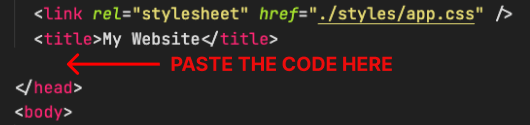
2. Fügen Sie den Code ein
Platzieren Sie den Code direkt vor dem </head>-Tag im HTML Ihrer Website