Anmelden
WhatsApp Business Nutzung WhatsApp API
26 Klicks
Widget for Bookings
Use (company name)'s Widget for making bookings
IT / Technology
26 Klicks
tawandaantonio58
Use tawandaantonio58's Widget for making bookings
IT / Technology
26 Klicks
Asesor Creativo
¿Cómo puedo ayudarte?
Agency / SEO / Design
26 Klicks
ingvictor1
¿Cómo puedo ayudarte?
Education
26 Klicks
Cambia tu salud
¿Cómo puedo ayudarte?
IT / Technology
26 Klicks
Machine Learning for Data Science
Más información aquí
Education
26 Klicks
solucionesdigitales
Use our WhatsApp account for support and sales
26 Klicks
Pack Control de Peso
Apúntate al movimiento Green Club
Food
26 Klicks
Angeles de luz
Use our WhatsApp account for support and sales
26 Klicks
Carlos Vargas
Carlos Vargas
IT / Technology
26 Klicks
Asadrivers
¡See Availability!
Travel
26 Klicks
Widget 1
Use our WhatsApp account for support and sales
Art
Vorherige
1
…
229
230
231
232
(current)
233
234
235
…
558
Nächste
Fügen Sie das Widget auf Ihrer Website hinzu
1. Kopieren Sie diesen Code
Ihr Widget-Code
Code kopieren
In die Zwischenablage kopiert
oder Ihre Schlüsselnummer (
Learn how to add your Widget to your Wordpress website
)
Schlüsselnummer kopieren
In die Zwischenablage kopiert
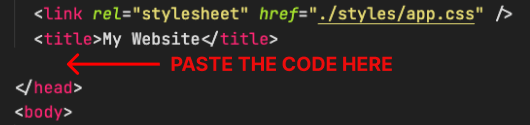
2. Fügen Sie den Code ein
Platzieren Sie den Code direkt vor dem </head>-Tag im HTML Ihrer Website